ECMA Scripting and WebParts in Sharepoint.
Hey,
Today I'm planning to present "How to do a webpart using client object model, which is capable of replicating multiple time within a same page". Most of Sharepoint developers developing webparts using client object model with ECMA scripting. However duplicate webparts cant included in a same page.
But below is a nice approach on solving above issue.
1.Create a visual webpart which is inheriting from System.Web.UI.WebControls.WebParts.WebPart
2.In the .cs file just add hidden property with webpart's clienID and
3.Read that client id to commit any changes.
I have attached a sample project consisting this solution. Open the solution from VS 2010.
File structure:
BlogViewer.cs - holding one webpart property, saving the property value to a hidden field, registering the js file, register main function of js - which is having the webpart client id to refer the control/s.
comscript.js - get the webpart client id, access webpart property value - which is already write to the hidden field, then populate the html file inside the webpart div.
control.htm - holding the markup of the webpart
Download from here : ECMAScripting
Trying to share development research findings while applying for day to day life.
Thursday, September 27, 2012
Monday, March 12, 2012
Debugging Email enabled list functionality
Hi Folks,
Sure you will be running out of your gas while searching whats happening to your debugging session, while receiving the emails to your Email enabled list instance (Ex: Announcement list). Do you have face below scenario ->
1.You create a Email enabled list instance
2.Create a event receiver to process incomming email objects.
3.Attach Debugger process or enter System.Diagnostics.Debugger.Break() above your lines
4.Rebuild and Deploy the solution (did a IISRESET )
5.List instance appearing and you have configured email address
6.Send sample email.
7.Email delivered to Drop folder, after sometime email object just vanished but debugger session not started.
If this is the case, no worries :). Just restart the Sharepoint timer job service through services. If you having VS 2010 installed there is a cryptographic exception related session try to start, just cancel it and restart the service again. Then after try to send a sample email to the list instance, you will get the debugging session and VS direct you to the EmailReceived() method or any other method
Sure you will be running out of your gas while searching whats happening to your debugging session, while receiving the emails to your Email enabled list instance (Ex: Announcement list). Do you have face below scenario ->
1.You create a Email enabled list instance
2.Create a event receiver to process incomming email objects.
3.Attach Debugger process or enter System.Diagnostics.Debugger.Break() above your lines
4.Rebuild and Deploy the solution (did a IISRESET )
5.List instance appearing and you have configured email address
6.Send sample email.
7.Email delivered to Drop folder, after sometime email object just vanished but debugger session not started.
If this is the case, no worries :). Just restart the Sharepoint timer job service through services. If you having VS 2010 installed there is a cryptographic exception related session try to start, just cancel it and restart the service again. Then after try to send a sample email to the list instance, you will get the debugging session and VS direct you to the EmailReceived() method or any other method
Sunday, February 26, 2012
Sharepoint 2010 Variations and Culture base subsite navigation
I'm planning to discuss sharepoint 2010 variations base features in this article. We can use variations to filter content according to the user browser language, and show. Just follow below steps and see how easy it is.
Pre-Requisittes:
3. Click on "Variations" (in here you can configure variation root site settings and other settings
4. Click on "Variation labels" from the view mentioned in step2
5. Repeat the above 4th step for "fr-FR" label
6. Click "Create Hierarchies" link from "Variations" screen mentioned in Step 4
7. Run the Timer job from Central administration
8. Open new browser and check the Language settings as in screens below.
9. Change the browser language and restart the browser. You will notice that fr-FR related content loading
when language changed to fr-FR and can observe the same behaviour for en-US. Enjoy variations stuff!
Pre-Requisittes:
- Create Web Application and a "publishing portal" site collection.
- Access "Site Action" -> "Site Settings"
3. Click on "Variations" (in here you can configure variation root site settings and other settings
4. Click on "Variation labels" from the view mentioned in step2
5. Repeat the above 4th step for "fr-FR" label
6. Click "Create Hierarchies" link from "Variations" screen mentioned in Step 4
7. Run the Timer job from Central administration
8. Open new browser and check the Language settings as in screens below.
9. Change the browser language and restart the browser. You will notice that fr-FR related content loading
when language changed to fr-FR and can observe the same behaviour for en-US. Enjoy variations stuff!
Tuesday, January 17, 2012
Data View Webpart Show/Hide Accidently
Hey folks, yesterday I have faced a weird issue, it's in a webpart that I have designed. Result is a high level defect :)
Issue: Dataview webpart not showing the list contents properly, it's just vanished. Development environment it's properly showing.
So I have started to search the root cause of the issue
1.Checked whether list instance properly deploying.....passed
2.Check dataview webpart markup in onet.xml and verify deployment......passed
3.Check and compare the xslt and parameters passing to the webpart......passed
4.Check Styles of the webpart...........issue occured
I have noticed webpart zone having a inline style as "display:none" which is hiding the webpart. So I have gone through the webpart styles again and unfortunately didn't find any inline style, causing issue.
So I have edit page:
1.Click on Restore webpart
2.Publish the page
Issue solved successfully.
Learning points: If we set restore on webpart it's get hide by adding inline style as "display:none". However this can be helpful to you in your daytoday life, so decided to share.
Issue: Dataview webpart not showing the list contents properly, it's just vanished. Development environment it's properly showing.
So I have started to search the root cause of the issue
1.Checked whether list instance properly deploying.....passed
2.Check dataview webpart markup in onet.xml and verify deployment......passed
3.Check and compare the xslt and parameters passing to the webpart......passed
4.Check Styles of the webpart...........issue occured
I have noticed webpart zone having a inline style as "display:none" which is hiding the webpart. So I have gone through the webpart styles again and unfortunately didn't find any inline style, causing issue.
So I have edit page:
1.Click on Restore webpart
2.Publish the page
Issue solved successfully.
Learning points: If we set restore on webpart it's get hide by adding inline style as "display:none". However this can be helpful to you in your daytoday life, so decided to share.
Monday, January 2, 2012
Javascript Water mark effect for your password field
Most of web developers like or not, they have to deal with forms every time. There can be password fields available in your form itself with a magical effect of water mark. Herewith I would like to simulate a way to implement this functionality.
Functionality: We can have 3 textboxes (one to hold password, second to hold default text to be appeared and last one for move between 2 text boxes previously mentioned). So if there were no text in first text box we show second text box with default text, if else show password text with letters with hidden characters.
So lets strart to implement.
1.Open VS 2008/2010 and open a new ASP.Net project
2.Add Text box and make it a password type (see the code snippet below)
<div id="divPassword">
<asp:TextBox ID="txtCurrentPassword" TextMode="Password" runat="server"
onblur="restorePassword('divPassword', 'divDummyPassword')"></asp:TextBox>
</div>
Note: javascript function refer in onblur attribute will be describe in below steps
3.Then add next text box which is holding the default text to be appeared when there were no characters
<div id="divDummyPassword">
<asp:TextBox ID='txtDummyPassword' runat='server' Text="Enter your current password"
onfocus="changePassword('divPassword', 'divDummyPassword')"></asp:TextBox>
</div>
4.Then add 3rd text box which is a hidden text box to show when user click on first text box
<div>
<input id="PasswordHidden" runat="server" type="hidden" />
</div>
As you can see we are calling "onblur" function and "onfocus" function in different occasion. It's because we are going to load default text based text box initially with "onfocus" and "onblur" used while leaving password text box.
So lets see how our 2 javascripts being design
<script language="JavaScript" type="text/javascript">
function changePassword(divPassword, divDummyPassword) {
document.getElementById(divPassword).style.display = '';
document.getElementById(divDummyPassword).style.display = 'none';
document.getElementById('<% =txtCurrentPassword.ClientID %>').focus();
}
function restorePassword(divPassword, divDummyPassword) {
if (document.getElementById('<% =txtCurrentPassword.ClientID %>').value == '') {
document.getElementById(divPassword).style.display = 'none';
document.getElementById(divDummyPassword).style.display = '';
}
}
</script>
As you can see, we just show and hide 2 divs, clear and assign focus appropriately to view and show the default text. So what about hidden field we implemented. Whenever user click on default text, our hidden textbox holding the values we are entering with temporary basis and then assign our values to correct text box for use further.
<script language="JavaScript" type="text/javascript">
if (document.getElementById('<% =PasswordHidden.ClientID %>').value != '' && document.getElementById('<% =txtCurrentPassword.ClientID %>').value == '') {
document.getElementById('<% =txtCurrentPassword.ClientID %>').value = document.getElementById('<% =PasswordHidden.ClientID %>').value;
document.getElementById('divPassword').style.display = '';
document.getElementById('divDummyPassword').style.display = 'none';
}
else {
document.getElementById('divPassword').style.display = 'none';
document.getElementById('divDummyPassword').style.display = '';
}
</script>
Note: this script should appear just above the end of form tag.
Whole sample:
<form runat="server">
<script language="JavaScript" type="text/javascript">
function changePassword(divPassword, divDummyPassword) {
document.getElementById(divPassword).style.display = '';
document.getElementById(divDummyPassword).style.display = 'none';
document.getElementById('<% =txtCurrentPassword.ClientID %>').focus();
}
function restorePassword(divPassword, divDummyPassword) {
if (document.getElementById('<% =txtCurrentPassword.ClientID %>').value == '') {
document.getElementById(divPassword).style.display = 'none';
document.getElementById(divDummyPassword).style.display = '';
}
}
</script>
<div id="divPassword">
<asp:TextBox ID="txtCurrentPassword" TextMode="Password" runat="server"
onblur="restorePassword('divPassword', 'divDummyPassword')"></asp:TextBox>
</div>
<div id="divDummyPassword">
<asp:TextBox CssClass="txt_w187" ID='txtDummyPassword' runat='server' Text="Enter your current password"
onfocus="changePassword('divPassword', 'divDummyPassword')"></asp:TextBox>
</div>
<div>
<input id="PasswordHidden" runat="server" type="hidden" />
</div>
<script language="JavaScript" type="text/javascript">
if (document.getElementById('<% =PasswordHidden.ClientID %>').value != '' && document.getElementById('<% =txtCurrentPassword.ClientID %>').value == '') {
document.getElementById('<% =txtCurrentPassword.ClientID %>').value = document.getElementById('<% =PasswordHidden.ClientID %>').value;
document.getElementById('divPassword').style.display = '';
document.getElementById('divDummyPassword').style.display = 'none';
}
else {
document.getElementById('divPassword').style.display = 'none';
document.getElementById('divDummyPassword').style.display = '';
}
</script>
</form>
Note: Don't just copy and paste, allocate some time to understand the flow of the script
Whole sample:
<form runat="server">
<script language="JavaScript" type="text/javascript">
function changePassword(divPassword, divDummyPassword) {
document.getElementById(divPassword).style.display = '';
document.getElementById(divDummyPassword).style.display = 'none';
document.getElementById('<% =txtCurrentPassword.ClientID %>').focus();
}
function restorePassword(divPassword, divDummyPassword) {
if (document.getElementById('<% =txtCurrentPassword.ClientID %>').value == '') {
document.getElementById(divPassword).style.display = 'none';
document.getElementById(divDummyPassword).style.display = '';
}
}
</script>
<div id="divPassword">
<asp:TextBox ID="txtCurrentPassword" TextMode="Password" runat="server"
onblur="restorePassword('divPassword', 'divDummyPassword')"></asp:TextBox>
</div>
<div id="divDummyPassword">
<asp:TextBox CssClass="txt_w187" ID='txtDummyPassword' runat='server' Text="Enter your current password"
onfocus="changePassword('divPassword', 'divDummyPassword')"></asp:TextBox>
</div>
<div>
<input id="PasswordHidden" runat="server" type="hidden" />
</div>
<script language="JavaScript" type="text/javascript">
if (document.getElementById('<% =PasswordHidden.ClientID %>').value != '' && document.getElementById('<% =txtCurrentPassword.ClientID %>').value == '') {
document.getElementById('<% =txtCurrentPassword.ClientID %>').value = document.getElementById('<% =PasswordHidden.ClientID %>').value;
document.getElementById('divPassword').style.display = '';
document.getElementById('divDummyPassword').style.display = 'none';
}
else {
document.getElementById('divPassword').style.display = 'none';
document.getElementById('divDummyPassword').style.display = '';
}
</script>
</form>
Note: Don't just copy and paste, allocate some time to understand the flow of the script
Get ruleset violation using FxCop
Most of you may wondering, how to analyse and find whether your VS 2008 project having RuleSet violations. You can install FxCop and check whether your compiled project having RuleSet violations.
You can read more about FxCop in below url:
msdn url for FxCop
Steps to follow:
1.Build your VS project using "Release" mode
2.Open Installed FxCop and open new project
3.Set appropriate rules to be use when analysis running
4.Attach your exe in bin folder to "Add target for analysis"
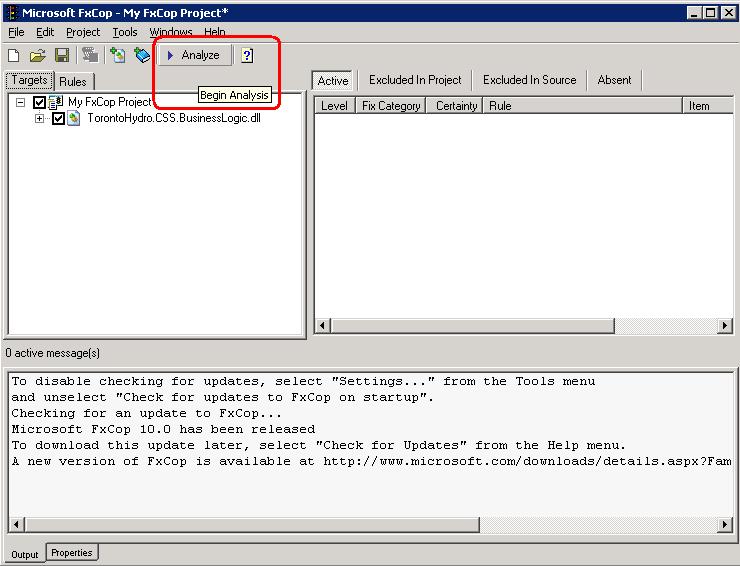
5.Run analysis
6.View results and apply fixes
You can read more about FxCop in below url:
msdn url for FxCop
Steps to follow:
1.Build your VS project using "Release" mode
2.Open Installed FxCop and open new project
3.Set appropriate rules to be use when analysis running
5.Run analysis
6.View results and apply fixes
Subscribe to:
Posts (Atom)