Tuesday, September 23, 2014

Error occured in deployment step 'Activate Features': Unable to locate the workflow's association data. To restore the association data..

Hey Friends,

Have you ever faced an issue like below, while developing Sequential workflow for SharePoint 2013, using VS 2012. 


Be cool, solution is there

Reason for the issue:

I'll give some context on Workflows. Workflows were having several number of Tasks and actions to perform, upon ItemAdding and ItemUpdating. Workflow will update entries in Task List (created for each workflow by default) and History list will record the steps executed (History list also get created). So while creating the workflow through VS 2012, Association between Task List, History List and Workflow will be created automatically by VS 2012. This error will appear after you have tried to redeploy same workflow code to different site collection and if your workflow already undergone some processing tasks.

Fix for the issue:

Just select the Workflow node from the project and check the properties window. notice the parameter "Auto Associate" and make it "False"


That's it, Rebuild the project and try to deploy to the site collection. Error will vanish.

Good Luck!

References:

http://blogs.msdn.com/b/exploring_technology_/archive/2011/10/19/error-occurred-in-deployment-step-activate-features-unable-to-locate-the-workflow-s-association-data.aspx


Wednesday, September 17, 2014

Provisioning a publishing web page with a simple webpart (SP2010 + VS 2010) - simplified steps

Hey Folks,

While I'm checking for the easiest way to publish a page with a webpart, I think I have found set of steps and thought to share for any users (Advance/Beginner). So let's jump in.

1.Open your VS 2010 environment with Administrator privileges.
2.Open new SP 2010 project (I have created project called "TestProvision")


Select correct site collection to be use with farm level deployment (make sure you have activated publishing features in your site collection)


3.Add Feature to host webpart deployment (this feature scoped as Site)


4.Create a folder as "CustomWebParts"

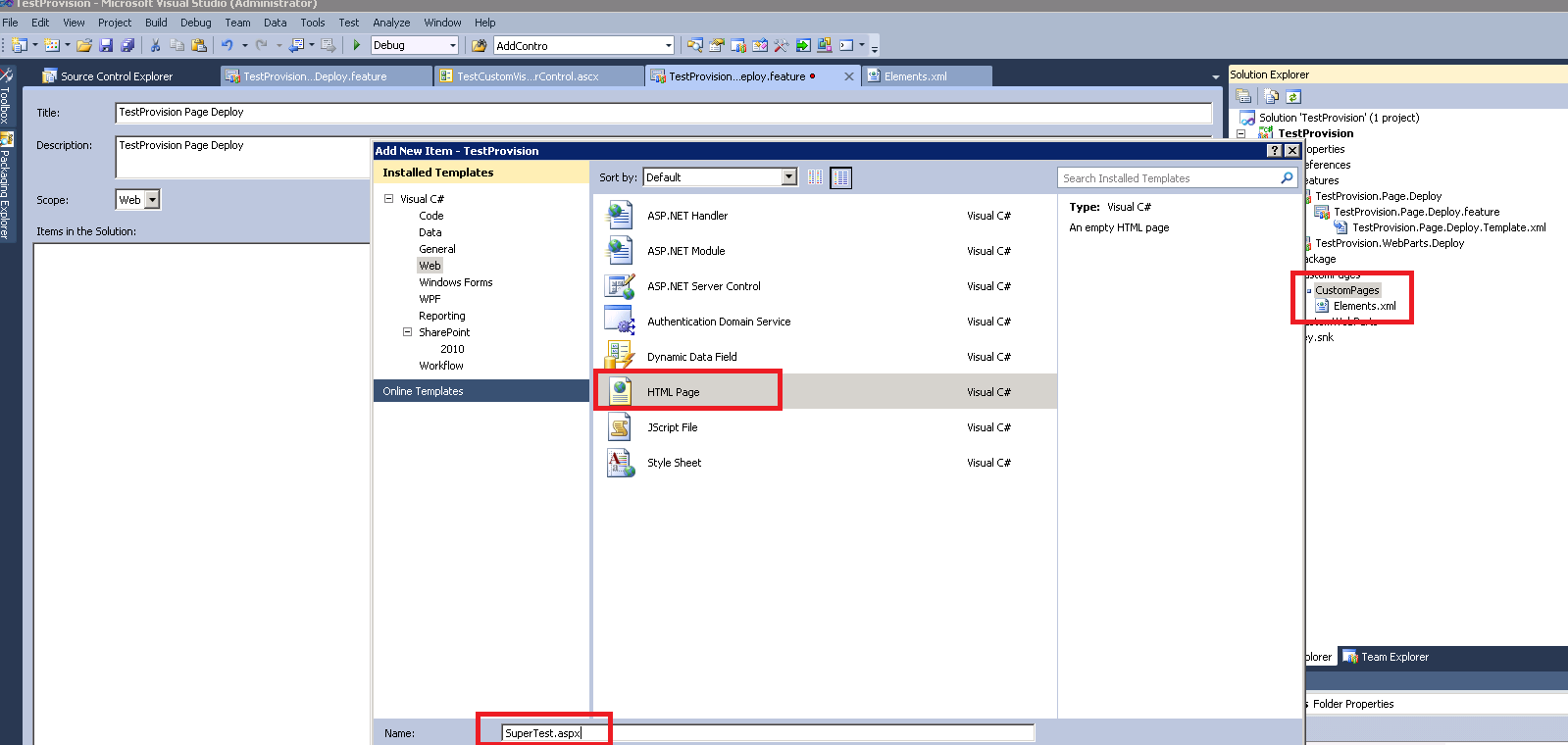
5.Add new item (Visual WebPart would be prefered)


6.Create another feature to host provisioning webpart page (scoped web)


7.Add Folder called "CustomPages"

8.Add new Module


9.Delete default "Sample.txt"

10.Add new .aspx page


11.Modify Element.xml file in Module and add below code

<?xml version="1.0" encoding="utf-8" ?>
<Elements xmlns="http://schemas.microsoft.com/sharepoint/">
  <Module Name="CustomPages" Url="Pages" Path="" RootWebOnly="FALSE">
    <File Name="SuperTest.aspx" Url="SuperTest.aspx" Type="GhostableInLibrary" Path="CustomPages\SuperTest.aspx" IgnoreIfAlreadyExists="TRUE">
      <Property Name="Title" Value="Super Test" />
      <Property Name="PublishingPageLayout" Value="~SiteCollection/_catalogs/masterpage/BlankWebPartPage.aspx, Blank Web Part page" />
      <Property Name="ContentType" Value="MyPageLayoutContentType" />      
    </File>
  </Module>
</Elements>

Special Note: Module-> Url parameter is the document library that "SuperTest.aspx" page will deploy. In File->Path, you should add the absolute path to the page. I'm using Blank Web Part page layout. "ContentType" would be any contenttype as you wish.

Then add the webpart markup. Go to below file 


Add that code to Element file like below

<?xml version="1.0" encoding="utf-8" ?>
<Elements xmlns="http://schemas.microsoft.com/sharepoint/">
  <Module Name="CustomPages" Url="Pages" Path="" RootWebOnly="FALSE">
    <File Name="SuperTest.aspx" Url="SuperTest.aspx" Type="GhostableInLibrary" Path="CustomPages\SuperTest.aspx" IgnoreIfAlreadyExists="TRUE">
      <Property Name="Title" Value="Super Test" />
      <Property Name="PublishingPageLayout" Value="~SiteCollection/_catalogs/masterpage/BlankWebPartPage.aspx, Blank Web Part page" />
      <Property Name="ContentType" Value="MyPageLayoutContentType" />
      <AllUsersWebPart WebPartZoneID="Head" WebPartOrder="1">
        <![CDATA[<?xml version="1.0" encoding="utf-8"?>
<webParts>
  <webPart xmlns="http://schemas.microsoft.com/WebPart/v3">
    <metaData>
      <type name="TestProvision.CustomWebParts.TestCustomVisualWebPart.TestCustomVisualWebPart, $SharePoint.Project.AssemblyFullName$" />
      <importErrorMessage>$Resources:core,ImportErrorMessage;</importErrorMessage>
    </metaData>
    <data>
      <properties>
        <property name="Title" type="string">TestCustomVisualWebPart</property>
        <property name="Description" type="string">My Visual WebPart</property>
      </properties>
    </data>
  </webPart>
</webParts>]]>
      </AllUsersWebPart>
    </File>
  </Module>
</Elements>

Special Note: Use any WebPartZone as you wish. I used "Head" zone just to demonstrate possibilities.

Your control can have simple thing like below


12.Open newly created .aspx file and copy below code

<%@ Page Inherits="Microsoft.SharePoint.Publishing.TemplateRedirectionPage,Microsoft.SharePoint.Publishing,Version=12.0.0.0,Culture=neutral,PublicKeyToken=71e9bce111e9429c" %>
<%@ Reference VirtualPath="~TemplatePageUrl" %>
<%@ Reference VirtualPath="~masterurl/custom.master" %>

13.Open Manifest.xml file of the feature and double check below entries were automatically added. (If not modify the Manifest.xml file and add those entries)


14.Build the project

15.Package wsp

16.Deploy the .wsp to Site collection


that's it, go to Site Actions -> View All site contents -> Go to Pages Library (or just go to http://<YourSiteCollection/Pages/Forms/AllItems.aspx>)...You will notice the page will appear with your webpart.


Good luck!

Tuesday, September 16, 2014

configure SharePoint:DateTimecontrol to run server side for dynamically generated controls

I'm sure you may wonder, why do we care about Server side firing of default validation comes with SharePoint:DateTime Control. We just can enable IsRequired = "True" and configure <control>.ErrorMessage with appropriate styles.

Yes you are correct. However think about a scenario that client want to have server side validators plus client side validators like SharePoint:Datetime control. If this is the case, can you imagine the main issue. When end user clicks on "Submit" button first application fires client side validation. Then after fires the server side validators within separate post back. This issue would be a great headache for sure.

So let's dig into the issue using my scenario. All fields were generating dynamically using the SharePoint list fields and controls were in <tr><td></td></tr> sets. Ultimately no server control markup to configure attributes. then I have created the DateTime control object from the BaseFieldControl(Microsoft.SharePoint.WebControls) object get passed.

DateTimeField dateTimeField = (DateTimeField)control;

Then I have disabled IsRequired from there.

dateTimeControl.IsRequiredField = false;


After that I have added a label control dynamically (initially setting styles to hide on load), while adding the control id to the Session. So ultimately I can access the control through button code behind.

Finally, get the control id from session variables and check whether datetimecontrol is empty or not. If empty we will reset styles to show the error message label and hide if not. This was my simple solution within my context. Hope will help someone and thought to share.

Thursday, July 3, 2014

SharePoint 2013 Search Magics -> Continuous Crawling

What is Crawling?

There are 3 methods can be used within SharePoint 2013. They are Incremental crawl (default schedule is 4 hours), Full crawl (default schedule is 4 hours) and most importantly Continuous Crawl. Crawling is the process of analysing content from "content source/s" and make available for Search results.

What is Continuous Crawling?

Continuous crawls crawl SharePoint site frequently to keep search results fresh. Continuous crawl will happen in 15 minutes interval. Ultimately users can configure this time interval from 1 minute to 15 minutes

Continuous crawling interval re-configure (put any minutes from 1 - 15 in parameter "n")

$ssa = Get-SPEnterpriseSearchServiceApplication
$ssa.SetProperty("ContinuousCrawlInterval",n)


Disable continuous crawl

$SSA =  Get-SPEnterpriseSearchServiceApplication
$SPContentSources = $SSA | Get-SPEnterpriseSearchCrawlContentSource | WHERE {$_.Type -eq "SharePoint"}
foreach ($cs in $SPContentSources)
{
  $cs.EnableContinuousCrawls = $false
  $cs.Update()
}

Monday, November 19, 2012

Simple jQuery Tabbing with Time interval

Hi Friends,

I thought to share simple things more frequently and occasionally post more detail findings (since we are on war to fight with time :) )

If your div structure is below:

<body onload="javascript:TabInterval();">

<div id="div1">
<p>This is Div 1</p>
</div>
<div id="div2" style="display: none;">
<p>This is Div 2</p>
</div>
<div id="div3" style="display: none;">
<p>This is Div 3</p>
</div>

</body>

We can simply rotate these divs using .show() and .hide() methods

So, Try with below jQuery script

<script type="text/javascript">
//starting point for the rotation, after initially load div 1  
var startRootDiv = 2;
    function rotateAllDivs() {
        if (startRootDiv == 2) {
            $("#tab1").hide();
            $("#tab2").show();
            startRootDiv = 3;
        }
        else if (startRootDiv  == 3) {

            $("#tab2").hide();
            $("#tab3").show();           

            startRootDiv = 1;
        }
        else {

            $("#tab1").show();
            $("#tab3").hide();           

            startRootDiv = 2;
        }
    }
    function TabInterval() {
        setInterval(rotateAllDivs, 5000);
    };
</script>

This div tabbing configured to run with a time interval of 5 seconds.

Happy simple coding :)

Buddike

Wednesday, November 7, 2012

Trying to use an SPWeb object that has been closed or disposed and is no longer valid.

Hi Guys,

You may have faced this kind of error while coding the webparts and provisioning them in SharePoint pages. May be you will face this issue while trying to edit a page, that having the webpart with below code

using(SPWeb web = SPContext.Current.Web)
{
//Your code here
}

Issue is with using statement, its disposing your SPWeb object automatically when you leaving using block. Use below than the above block

SPWeb web = SPContext.Current.Web

Hope you will figure it out within your code.

Happy coding guys,

Buddike

Thursday, November 1, 2012

SharePoint Search Refinement Panel

Hi Guys,

You may like to learn more about search refinement panel and how to use it.

Scenario:

Think that your client have several departments and each department having seperate documents to be use. Each department is a site collection and these specific documents residing in a document library called "Department Docs". So client asking for search refinement to implement.

My steps will be like below:

1.Create a Site column for holding departments, type : choices
2.Check the Document library residing in side the department site collection
3.Add the column to the default view of the document library
4.Add several documents to the library
5.Do a incremental crawl to the content source, through Central Admin-> Application Management -> Search Application-> Content Source
6.Wait till crawl completes
7.Create Managed Meta Data property
8.Do a full crawl
9.Create a Enterprise Search Centre page
10.Modify the page and Edit Refinement Panel webpart
11. Modify below category markup and save the webpart

<Category Title="Departments" Description="Departments docs" Type="Microsoft.Office.Server.Search.WebControls.ManagedPropertyFilterGenerator" MetadataThreshold="0" NumberOfFiltersToDisplay="3" MaxNumberOfFilters="20" ShowMoreLink="True" MappedProperty="Departments" MoreLinkText="show more" LessLinkText="show fewer" />


Note:
Title: appear in the refinement panel
MetadataThreshhold : if your department column having metadata this is the minimum value to use when displaying the results
MappedProperty : This is the Field name you have used to create the managed metadata.
12.Checkin the page
13.Run a search...There you can find the refinement values you have just configured.

I'll update this post with more screens, while time permits

Happy coding,

Buddike